I've learned recently that my debugging workflow is a little unusual, so I thought it would be interesting to document some of it. If you don't already know, my main side project for the past several years has been a rule-based bot that plays the card game Hanabi with human conventions. You can play with it on hanab.live by inviting any of the will-bots to your table.
Because my bot implements human conventions, it's very easy to notice when the bot behaves "unconventionally", like playing an unsignalled card or giving a nonsensical clue. Thus, I often get bug reports in the form of "I was playing with your bot and it did this, but it should have done that instead". Occasionally, the reporter may have an idea of why the bot behaved that way (e.g. it disregarded a particular convention, or it fell into a common beginner trap), but my bot isn't human and doesn't always behave predictably. The rest of this post assumes familiarity with H-Group conventions, but should be generally understandable if you're at least familiar with Hanabi.
An example bug report
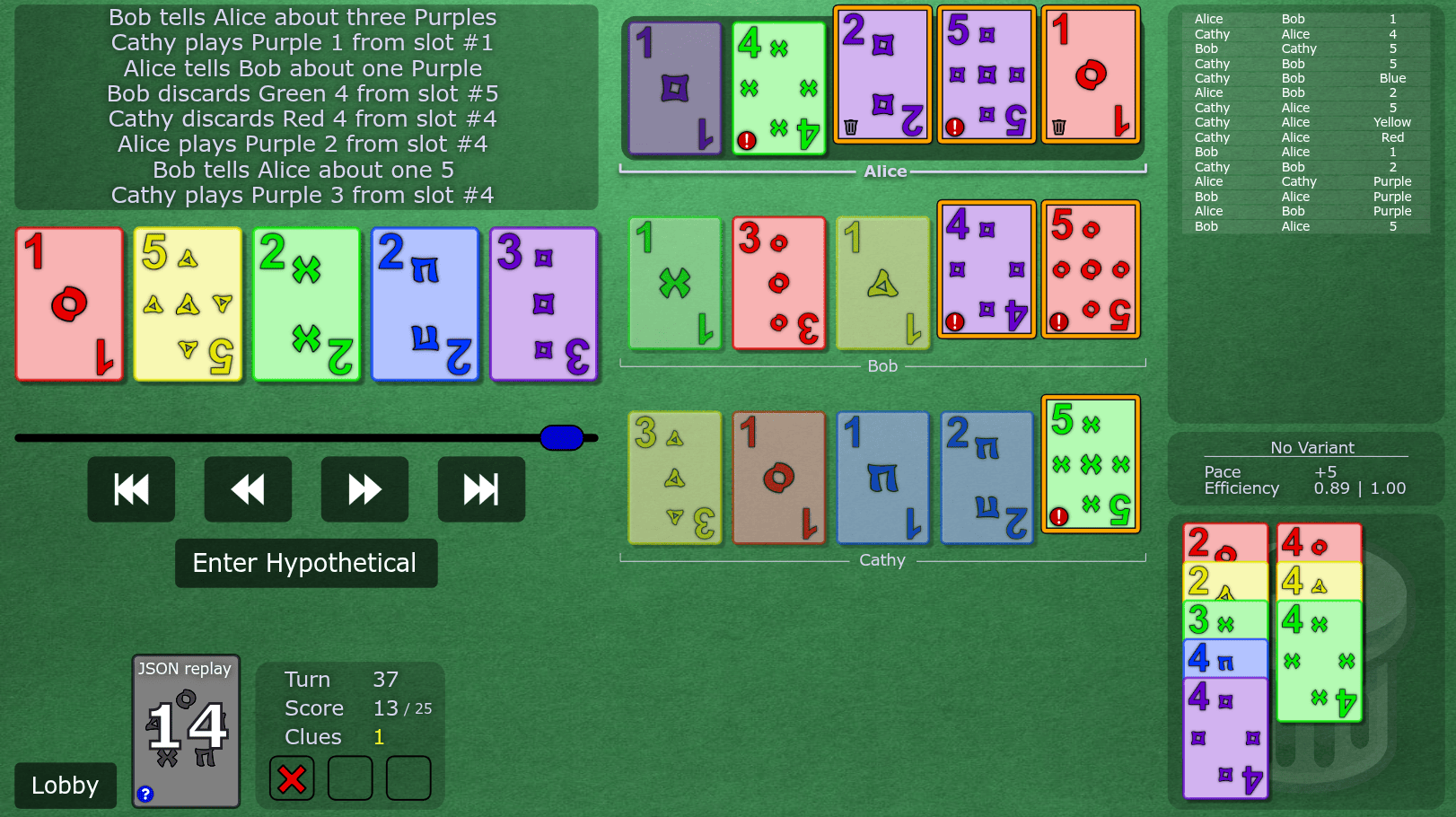
Here's a typical replay, with names removed for anonymity (the bot was Alice). The game is played at H-Group level 11, and the bot version is v0.10.11. On turn 37, Alice discards the critical g4 from chop instead of either of their two clued trash.
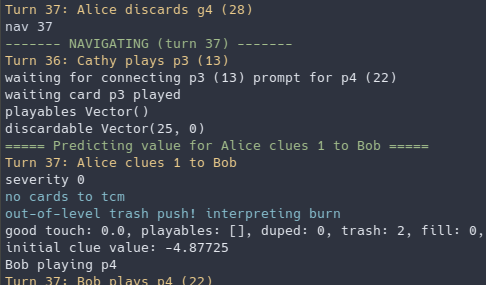
I use Zed as my text editor and Konsole (bash) as my terminal. I prefer to have them in separate windows so each program has maximum screen space2. During a game, my bot writes several logs to the console as it interprets every action that is taken. On its turn, it additionally logs the results of potential actions it could take and their resulting values. Here's a typical log statement:
I have a replay feature built into the bot that accepts a hanab.live replay id and lets you "jump" between turns. This is a module that simply fetches the game data from the server and simulates a game with the bot logic, without connecting a websocket or anything. The command is scala-cli . --main-class scala_bot.replay -- id=<replay id> convention=HGroup level=11 index=0. The index field indicates which player the bot should simulate, with index 0 being the player that goes first, index 1 being the player that goes 2nd, etc. Running this command will spam console output with all of the logs produced by simulating every action from the game. To jump to turn 37, type nav 37 into the console (the program accepts console input while running).
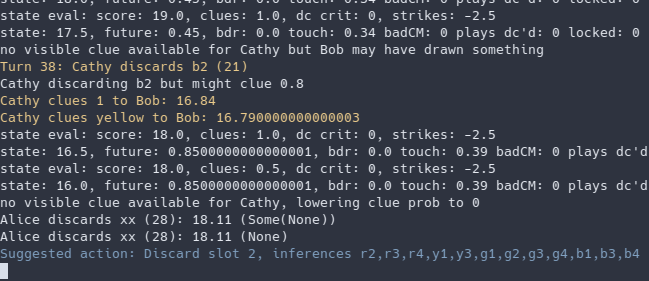
The console output should now show the logs of the bot's decision-making on turn 37. First, it interprets the most recent action, which isn't very much. Then, since it's the bot's turn, it simulates all of its legal actions and logs a state evaluation of each before suggesting the highest-value action at the end. This suggested action is almost always the action the bot took in game: if it isn't, the bug can't be replicated and is probably much harder to fix. We can see that it suggests the unconventional action of discarding slot 2, rather than its trash cards.
To get an idea of what is known about each of its cards, we can use a different command supported in the replay module: hand Alice. This command prints the common knowledge state (i.e. from clues and including info everyone knows everyone knows everyone knows...) of Alice's hand on this turn. Each card is identified by its order from the top of the deck, where the top card is order 0. The hand command thus displays the hand from newest to oldest (left to right on hanab.live). Slot 5 is known trash, but curiously, even though hanab.live shows a trash icon on slot 3, the common perspective infers slot 3 to be exactly [p4].
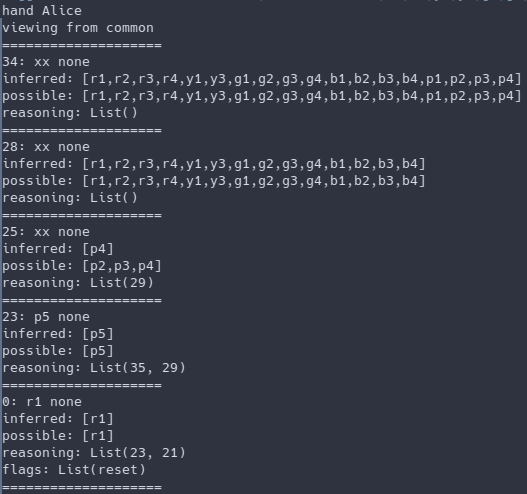
If we think about this, this makes sense. The common perspective can't see Bob holding the critical copy of p4, and the p5 is fully known, so the only good touch identity that Alice's slot 3 can be is (also) p4. However, we can verify that Alice privately knows extra information by using the hand command from Alice's point of view: hand Alice Alice. This now includes info known from seeing Bob's and Cathy's cards, and slot 3 is indeed known to be not p4.
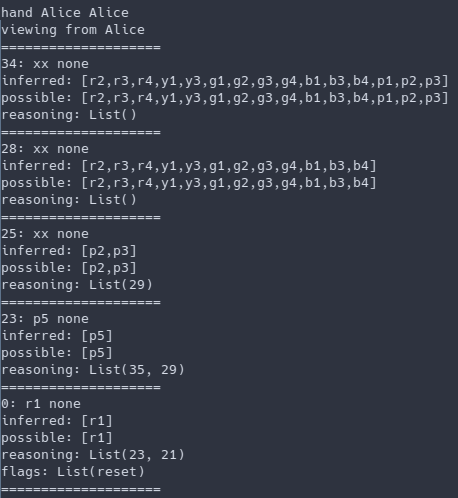
Now that we know this, you may have an idea why the bot behaved strangely. But to be extra sure, we can look at why the bot decided not to discard either of its clued trash cards from the original output of nav 37. You can either scroll up or retype the command in the terminal. We can see that due to the existence of "p4" in Alice's hand, discarding the commonly known trash in slot 5 (order 0) is interpreted as a Shout Discard Chop Move. The bot recognizes that this would chop move Bob's y1 (a trash card), thus classifying this action as a mistake. Strangely, it also considers discarding slot 3 (order 25) to be a Shout Discard.
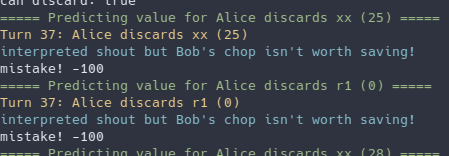
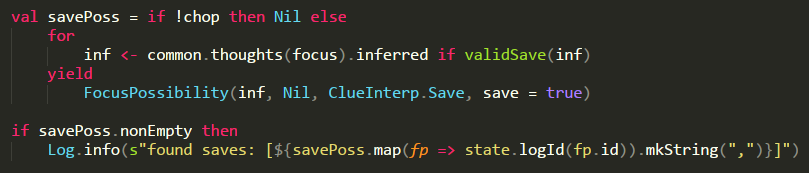
Now that the problem has been identified to be related to shout discards, we can look at the logic for interpreting SDCMs (see checkSdcm() in hgroup/interpretDc.scala). A shout is identified if the player in the "previous" game (before the action) had a commonly-known playable and discarded trash known to us (Alice). This is true, since slot 3 was a "commonly-known" playable, and Alice knew it was trash. The simplest fix here is that when a player knows they don't actually have a playable, we shouldn't interpret a shout. [The line in green is newly added.]

Now, replaying the game and navigating to turn 37 correctly suggests discarding slot 3. Hurray! This was a fairly easy bug to fix, but just showing off the features of the replay module ended up making the post pretty long. When trying to figure out why the bot gave a strange clue, it tends to be much more complicated; I'll think about making a post about one of those later.
On debugging
I spend way more time fixing bugs than implementing new features, so it's very important to me that the debugging process is as streamlined and easy-to-use as possible. Originally, to debug a replay, I had to start a new game with the bot on the same seed and manually replay all the moves until reaching the desired turn. Obviously, this was unsustainable, but it was clear to me that I needed to be able to load a hanab.live replay with arbitrary conventions, navigate to arbitrary turns and easily inspect the knowledge state of people's hands; that's how the replay module and nav/hand commands came to be.
This style of logging is also very conducive to understanding bot behaviour at a glance with minimal programmer effort. Just by navigating to the problematic turn, the console is filled with detail about what the bot was thinking without needing to manually insert any print statements (including pretty-printing all the relevant structures) or breakpoints. This quickly narrows down the areas of interest so that further debugging, if necessary, can be focused on specific areas.
Although I certainly spent a non-trivial amount of time on this section of the bot that's invisible to most users, I think it has saved my overall debugging time many times over. It's allowed me to approach bugixing with determination rather than dread, and that's really important for the longevity of a passion programming project. When you need better debugging tools, make them yourself!
-
The convention and bot version are extremely important. I've received many reports where the bots were set to the wrong level or the player was playing with an outdated version of the bot. However, since people kept forgetting to verify this, I added a suggested feature where the bot would write its convention and version on a card note, so the reporter no longer needs to check this! ↩
-
Yes, I only use a single monitor. It's a holdover from when my PC was so weak that I could only have 1 application open at a time, but I still like just focusing on one thing at a time now. ↩